Customers Group
Overview
Customers Group is used to organize customers into groups and assign a percentage discount to each group.
Groups help administrators control customer pricing behavior in sales and POS workflows. A customer can be assigned to a group when the customer is created or edited.
Accessing Customers Group
Go to Customers -> Customers Groups.

Groups List
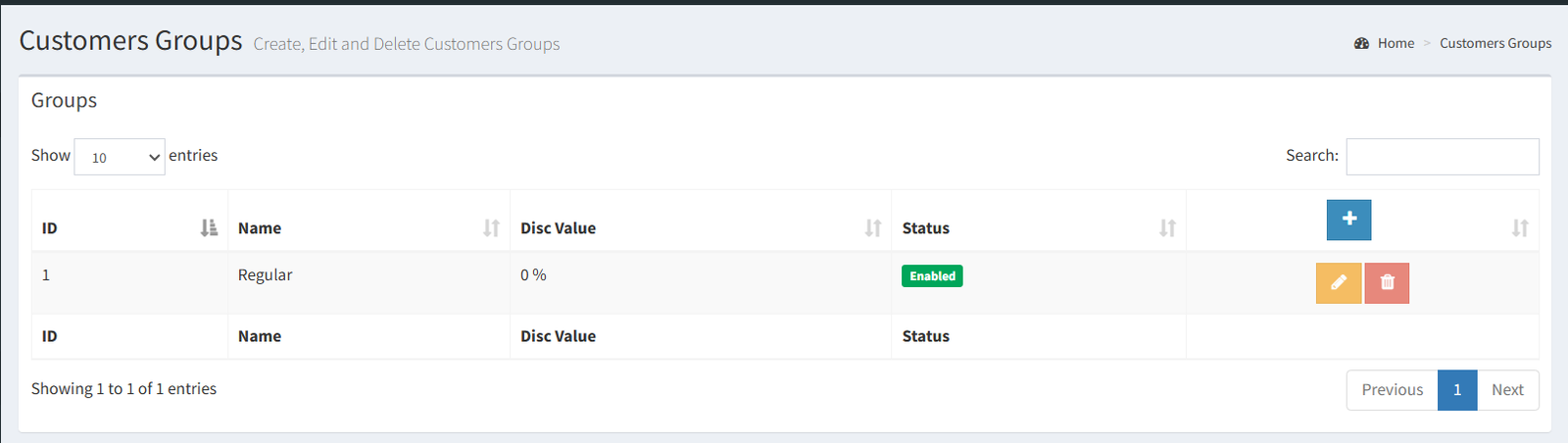
The Customers Groups page shows a table of customer groups.
The list includes:
- ID: the group ID.
- Name: the customer group name.
- Disc Value: the percentage discount assigned to the group.
- Status: whether the group is enabled or disabled.
- Actions: edit or delete actions when available.
The list uses a searchable and sortable table.
Adding a Customer Group
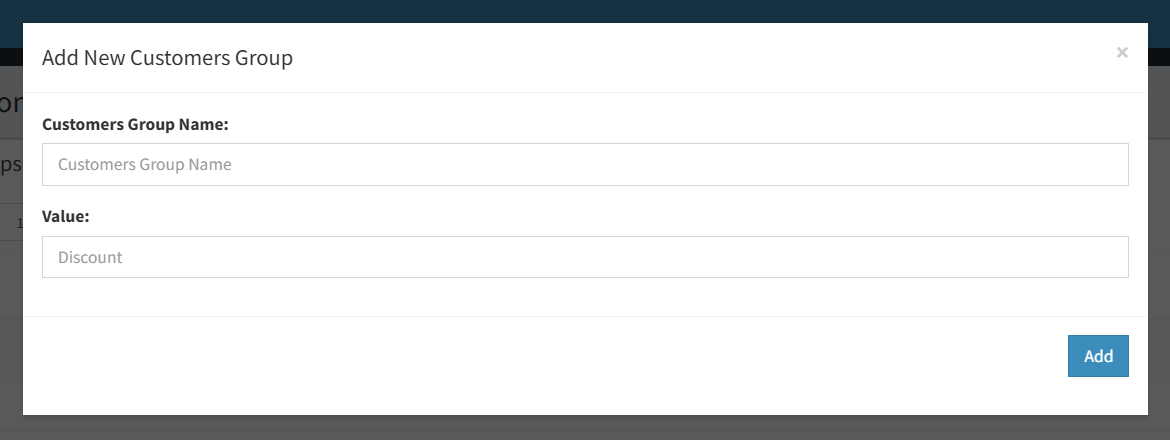
Use the Add button on the Customers Groups page to open the Add Customer Group modal.
Visible fields include:
- Customer group name
- Discount value
New customer groups are created as enabled groups.
Editing a Customer Group
Use the edit action beside a group to open the Edit Customer Group modal.
Visible fields include:
- Customer group name
- Discount value
- Enabled or disabled status
Use this screen to rename a group, change its discount percentage, or disable the group.
Deleting a Customer Group
Use the delete action beside a group to open the delete confirmation modal.
Customer groups with related customers may not be deleted. In that case, the system disables the group instead.
The default group cannot be edited or deleted from the verified UI because its action buttons are disabled.
Pricing / Discount Rules
The active UI supports a percentage discount value for each customer group.
When a customer belongs to a group, the group discount can be used as an automatic discount in Sales and POS pricing workflows.
Only percentage discount setup was confirmed in the active UI. Fixed amount discount setup and discount type selection were not found as active controls.
Where Customer Groups Are Used
Customer groups are used in:
- Customer creation: select a group when adding a customer.
- Customer editing: update the assigned group on the customer detail/edit page.
- Sales: customer group discount can be used when creating or editing sales.
- POS: customer group discount can be used as an automatic discount.
- Bulk WhatsApp audience: customer groups can be selected as the target audience for bulk customer messages.
Dedicated customer-group reports were not confirmed in the active UI.
- Creating a group but not assigning customers to it.
- Expecting a disabled group to appear as an available customer group in customer forms.
- Expecting the default group to be editable or deletable.
- Entering a discount value but expecting fixed amount discount behavior. The active UI uses percentage discount.
- Trying to delete a group that already has related customers.
Troubleshooting
The group does not appear when adding or editing a customer.
Check whether the group is enabled.
The discount is not applying as expected.
Confirm that the customer is assigned to the correct group and that the group discount value is correct.
The group cannot be deleted.
Groups with related customers may be disabled instead of deleted.
The edit or delete button is disabled.
The default group has disabled edit and delete actions in the verified UI.