E-Commerce Integrations
Overview
WooCommerce and Shopify integrations connect the local POS and inventory system with the online store. When supported and enabled, stock changes in the local system can synchronize with the website so online stock stays aligned with store inventory.
Integration pages belong in this section because they document website synchronization and e-commerce workflows, not basic product setup.
Supported Platforms
- WooCommerce: website orders, products, categories, product variations, and stock synchronization for linked items.
- Shopify: similar stock synchronization logic is available where Shopify support is enabled.
Enabling Integrations
Open System Setup -> Company Info -> Integrations.
The active integration settings include:
- WooCommerce Enabled
- WooCommerce Store URL
- WooCommerce Consumer Key
- WooCommerce Consumer Secret
- Force Full WooCommerce Sync
- Shopify Enabled
- Shopify Store URL
- Shopify Admin API Access Token
- Force Full Shopify Sync
WooCommerce Menu
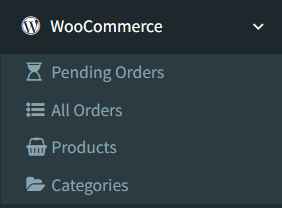
When WooCommerce is enabled and the user has access, the sidebar shows a WooCommerce menu with:
- Pending Orders
- All Orders
- Products
- Categories
The header can also show a WooCommerce pending-orders shortcut when there are pending orders.
Stock Synchronization
WooCommerce and Shopify stock synchronization is available for linked products when each integration is enabled.
The system includes scheduled stock sync commands for both platforms. These commands check linked items and dispatch stock update jobs when the calculated local stock is different from the last synced stock. Company Info also includes Force Full WooCommerce Sync and Force Full Shopify Sync buttons for a full stock sync.
Do not assume every local stock change is pushed immediately. Treat stock sync as active when synchronization is enabled, scheduled jobs are running, or an administrator uses the force sync button.
WooCommerce Documentation
Start with WooCommerce Pending Orders to review and take website orders into the local POS system.