Product By Size
Overview
Product By Size groups local products that share the same original product code or model code. It shows the available size variations and the stock quantity for each size in the group.
Use this page to:
- Review products that have multiple sizes.
- Check stock by size.
- Manage size-based product groups.
- Review website status when WooCommerce information is visible.
Opening Product By Size
Open Products Setup > Product By Size.
If the menu item is not visible, the e-shop integration may be disabled or your user may not have access to this page.
What The Table Shows
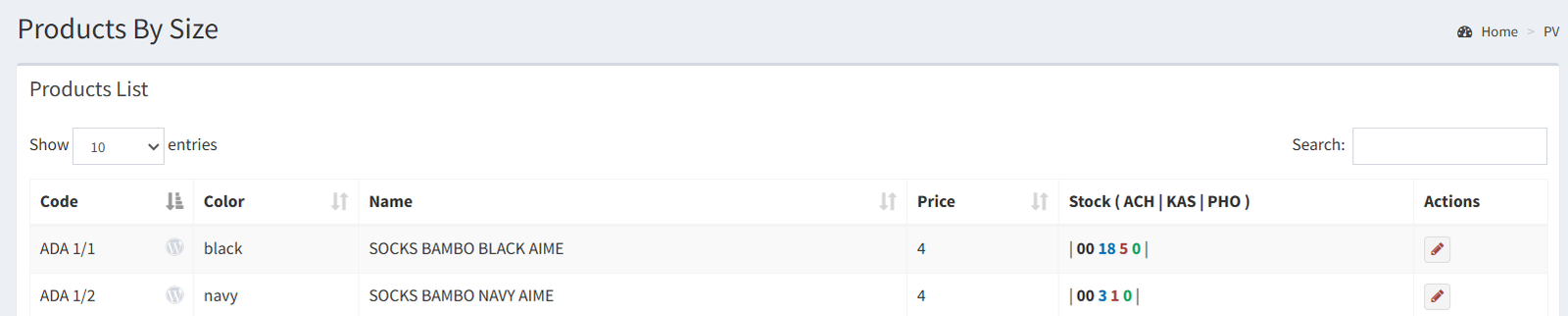
The table lists local products as grouped product models. Each group is based on the original product code or model code.
Common table information includes:
- Product or model name: the product name shown for the grouped item.
- Original code or group code: the shared code used to group the size variations.
- Size values: the available sizes in the group.
- Stock quantities: the stock shown for each size.
- Website or WooCommerce status: shown only when the page displays website status information.
- Action icons or buttons: available actions for the grouped product.
How To Read A Product Group
A product group represents one product model with multiple size options.
Example:
A shirt model may appear once as a grouped product. Inside that group, the page shows the available sizes, such as S, M, L, and XL, with the stock quantity for each size.
This lets you check whether the model is available in every size without opening each local product one by one.
Stock By Size
The stock area shows quantity by size. If store-level quantities are visible, each size may include stock values for the active stores.
Use this information to answer questions such as:
- Which sizes are available?
- Which sizes are out of stock?
- Which sizes have low stock?
- Which store has stock for a specific size, when store-level stock is shown?
Website Actions
Product By Size may show website or WooCommerce status when the e-shop integration is enabled.
Only use website actions that are visible on your screen. If your version shows website buttons, they may be used for actions such as publishing a grouped product, removing it from the website, or syncing size variants.
If those buttons are not visible, use Product By Size as a local size-group review page. Use Products Variance for WooCommerce variant management when those website controls are needed.
Difference From Products Variance
Product By Size is mainly for local product grouping by size. It groups products that share the same original product code or model code, then shows the available size values and stock quantities.
Products Variance is mainly for WooCommerce and e-commerce variant management. Use it when the website product needs variant setup, e-commerce mapping, or visible website sync actions.
Actions Reference
| Icon | Button / Action Name | Function | When To Use It | Notes |
|---|---|---|---|---|
| 🧩 Product By Size | Product By Size menu item | Opens the Product By Size page. | Use it when you need to review products grouped by size. | The menu item may depend on e-shop settings and user permissions. |
| 🌐 Website status | WooCommerce status indicator | Shows whether the product group appears linked to website information. | Use it to quickly check website status when the status icon is visible. | This is a status indicator, not always a clickable action. |
| ✏️ Edit | Edit product group | Opens the selected product group details. | Use it to review or manage the grouped product. | The group is based on the shared original code or model code. |
| 🔢 Size values | Size display | Shows the size variations in the group. | Use it to confirm which sizes exist for the model. | Example sizes include S, M, L, XL, or numeric sizes. |
| 📦 Stock quantities | Stock display | Shows stock for each size. | Use it to check availability by size. | Store-level stock may also appear when enabled. |
- Reading the group as one product only. The group represents multiple local products that share the same original code or model code.
- Reading stock as one total number. Stock is shown by size, and may also be shown by store.
- Expecting Product By Size to replace Products Variance. Product By Size is mainly local grouping; Products Variance is mainly e-commerce variant management.
- Looking for website actions when they are not visible. Only use website actions that are active on your screen.
Troubleshooting
If Product By Size is not visible, check that the e-shop integration is enabled and that your user has permission to open the page.
If a product group is missing, check that the local products use the same original product code or model code.
If stock looks wrong, check the local product stock for each size.
If website status does not appear, WooCommerce information may not be enabled or available for that product group.